Models and Providers

Sero uses providers for model access and model tiers for everyday choices. A profile can use hosted API-key providers, OAuth-backed providers from the Pi SDK, plugin-defined providers, and local/custom providers from models.json.

Sero does not bundle third-party credentials. You connect your own accounts, API keys, environment-backed credentials, or local endpoints.

Sero reads authentication methods from the active Pi provider metadata. Saved credentials stay in the desktop main process. Environment credentials are shown as environment-backed and are not overwritten when you change a saved key.

Quick path

  1. Create or open a profile.
  2. Connect at least one provider during onboarding or in Admin.
  3. Confirm provider health shows usable models.
  4. Pick LOW, MED, and HIGH defaults.
  5. Use the chat model selector only when you need a session-specific override. For the broader composer/context workflow, see Agent Sessions and Context.
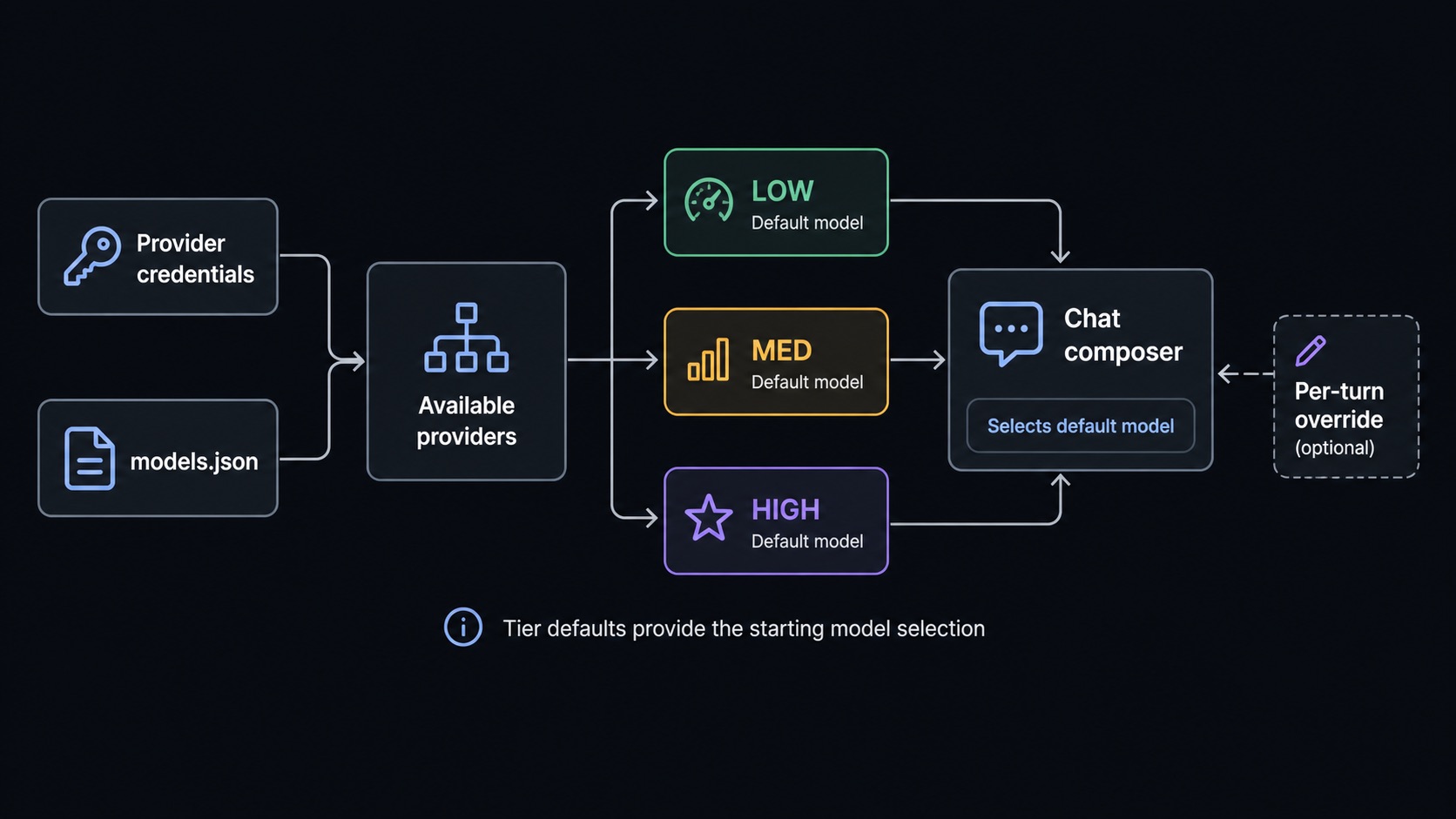
Model provider and tier selection

Provider types

Provider typeHow it is configuredTypical status
API-key providerAdd a key in Sero or provide an environment-backed key.healthy, env, missing, or broken_invalid
OAuth providerSign in through the OAuth flow exposed by the Pi SDK provider catalog.healthy, missing, or broken_expired
Plugin-defined providerInstalled/built-in package manifest exposes sero.providers metadata.Same as API-key providers when auth type is apiKey
Local/custom providerConfigure <SERO_HOME>/agent/models.json through Local models or by editing the file.local, healthy, missing, or unknown depending on registry results

Provider inventory

ProviderProvider IDAuth modeNotes
AnthropicanthropicAPI key or env-backed keyModels appear when credentials and registry data are available.
OpenAIopenaiAPI key or env-backed keyAlso used by voice transcription features that require OpenAI credentials.
Google (Gemini)googleAPI key or env-backed keyHosted Gemini model provider.
OpenRouteropenrouterAPI key or env-backed keyAggregated model provider.
xAIxaiAPI key or env-backed keyHosted xAI models.
GroqgroqAPI key or env-backed keyHosted Groq models.
CerebrascerebrasAPI key or env-backed keyHosted Cerebras models.
MistralmistralAPI key or env-backed keyHosted Mistral models.
Azure OpenAIazure-openai-responsesAPI key or env-backed keyAzure OpenAI Responses-compatible provider.
Hugging FacehuggingfaceAPI key or env-backed keyHosted Hugging Face provider.
Vercel AI Gatewayvercel-ai-gatewayAPI key or env-backed keyVercel gateway provider.
ZAIzaiAPI key or env-backed keyHosted ZAI provider.
OpenCodeopencodeAPI key or env-backed keyOpenCode provider.
Kimikimi-codingAPI key or env-backed keyKimi coding provider.

The active Pi SDK catalog also contains other API-key and OAuth providers. The provider list in Sero is the current inventory because the catalog can change when the Pi SDK changes.

Environment-backed keys are detected through Pi's provider auth handling. They are not copied into the UI as plain Sero-owned credentials. A failed remote model refresh does not undo a successful login or key change.

Plugin-defined providers

Packages can add provider metadata through sero.providers in their manifest. Sero scans compatible built-in packages, installed profile plugins under <SERO_HOME>/agent/plugins/, extensions under <SERO_HOME>/agent/extensions/, and configured local package paths.

ProviderProvider IDSourceAuth modeNotes
Alibaba Coding Planalibaba-coding-plangit:https://github.com/sero-labs/sero-alibaba-plugin.gitAPI key; env var ALIBABA_CODING_PLAN_KEYExternal provider-only plugin. Install it before selecting Qwen-family defaults.

Plugin-defined providers follow the same health/reconnect behavior as other API-key providers when their manifest declares auth.type: "apiKey".

Provider registrations are shared across active Sero sessions. A plugin must use unregisterProvider() only when it intends to disable that provider for the whole desktop host.

Provider health statuses

StatusMeaningWhat to do
healthySero found usable models for the provider.You can select its models.
envEnvironment-backed credentials were detected. Models may or may not be usable yet.If no models appear, check the env var value and provider access.
localA local/custom provider is configured in models.json.Test the local endpoint and fetch models if the list is empty.
missingNo saved credential or usable local configuration is available.Connect, add an API key, or configure a local provider.
broken_expiredSaved OAuth login looks expired or unavailable.Reconnect the provider.
broken_invalidSaved API key may be invalid or no longer works.Replace or remove the key, then reconnect.
unknownModels are available from a provider Sero cannot classify through the known catalogs.Use the model if expected; otherwise inspect plugins and models.json.

A provider can have credentials but no usable models. Sero keeps enough information to warn you rather than silently hiding broken saved choices.

LOW, MED, and HIGH tiers

Tiers are profile-level defaults:

TierIntended use
LOWFast, lightweight, lower-cost tasks.
MEDBalanced everyday work.
HIGHStronger reasoning or complex work.

Each tier stores both a model and a thinking level. Thinking is tier-based: LOW, MED, and HIGH can each use different thinking levels, and Sero only offers levels supported by the selected model.

Use Admin to change profile defaults. The model selector changes the model for the current session. Its gear icon opens Model Manager, where you can manage favourites, hidden models, and local providers.

Thinking levels

Sero derives available thinking levels from the selected model's provider, model ID, display name, reasoning flag, and whether the model appears to support extra-high reasoning. If a model does not support the selected thinking level, Sero warns instead of pretending the setting is valid.

Good defaults:

  • LOW: fast model with thinking off or low.
  • MED: everyday model with moderate thinking if supported.
  • HIGH: strongest model with higher thinking when useful.

Local and custom providers

Local/custom providers are stored in:

<SERO_HOME>/agent/models.json

Open Model Manager, then select Local. The quick setup options include LM Studio, Ollama, vLLM, and a custom OpenAI-compatible server.

For a task guide, see Local LLMs with LM Studio. For exact supported fields, see models.json Reference.

Recovery paths

SymptomRecovery
No providers are usable during onboardingConnect a provider, add an API key, or configure a local provider.
Provider shows env but no modelsCheck that the environment variable is available to Sero and that the provider account can list/use models.
OAuth provider shows expired/brokenReconnect through the provider auth flow.
API-key provider shows invalid/brokenReplace the key or remove the stale credential and connect again.
Local provider has no modelsStart the local server, test the URL, fetch models, and save.
Saved tier warns about unavailable modelReconnect the provider or choose another model in Admin → Model.
models.json error blocks local editingBack up and fix <SERO_HOME>/agent/models.json, then reopen the model manager or restart Sero.