
Remote Control
Remote Control lets you operate your local Sero desktop session from another trusted client. It is off by default and only starts when the desktop process is launched with:
Remote Control is not screen sharing and is not production remote administration. The work still happens on your desktop machine, in your active local Sero profile. Remote clients are alternate control surfaces for the Sero desktop process that is already running locally.
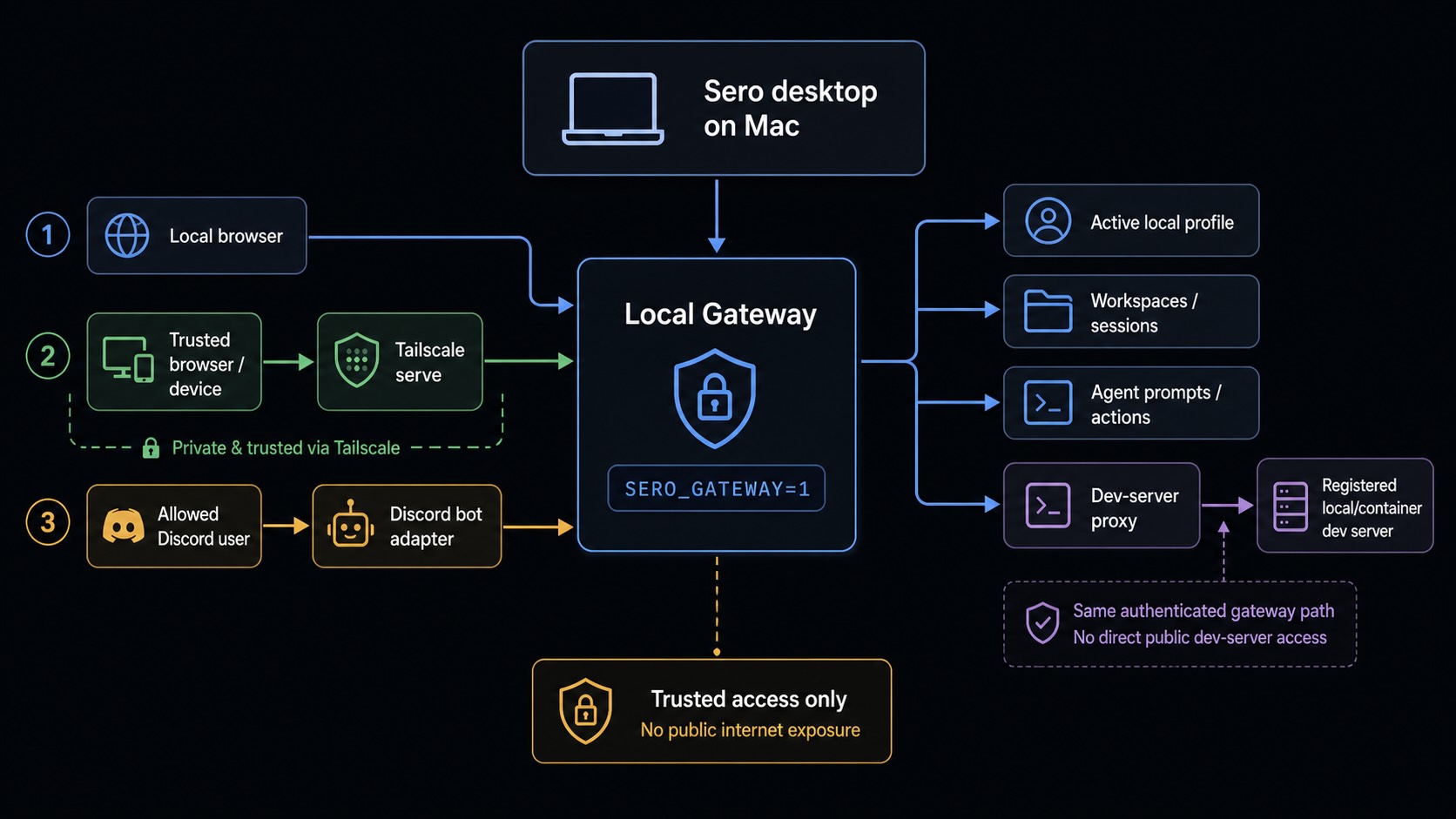
Remote Control has three related integration paths:
- Remote web access over Tailscale — a browser UI called Sero Remote can connect to your local Sero gateway from another trusted device on your Tailscale tailnet.
- Remote dev-server previews — dev servers started and registered inside Sero desktop can be opened through Sero Remote, so a Vite/Next/Express/etc. preview running on your desktop machine or workspace container is reachable from another trusted tailnet browser.
- Optional Discord bot — a configured Discord bot can forward allowed DMs or mentions into Sero as prompts.
Tailscale is the private VPN/tailnet layer for remote web access. Discord is a separate optional bot integration; it does not depend on Tailscale and it does not provide the Sero Remote web UI.
Read Security / Privacy before enabling Remote Control.
Start Sero with the gateway
Close Sero before you use one of these commands.
On macOS, run the executable inside the app bundle:
On Linux DEB installations, run:
For a Linux AppImage, replace the file name with the downloaded artifact:
On Windows PowerShell, replace the path with the location of your installed
Sero.exe:
Pair a device
Before you pair another device, install and connect Tailscale on both devices. Both devices must be in the same tailnet. A localhost URL works only on the same machine and cannot connect another device.
- Start Sero with
SERO_GATEWAY=1. - Confirm that Tailscale is connected and private
tailscale serveaccess is available. - Open the command menu and select Connect Device.
- Scan the QR code with the other device, or copy the Login URL into its browser.
- Confirm that Sero Remote shows the correct profile and workspaces.
The pairing gives the device access to all workspaces in the profile, including workspaces that you create later. The dialog shows the expiry time. Select Generate New Code when you need a new pairing URL.
Web vs Remote Control
Use the Web plugin for web context inside an agent session. Use Remote Control only when you need another trusted device or approved Discord user to interact with the local desktop session.
Access paths
Use Tailscale serve for tailnet-only exposure. Do not use public Tailscale funneling or direct public-internet exposure. Treat tailnet URLs as private access details and redact them from screenshots, logs, and support reports.
Sero Remote web access
Sero Remote is the browser-based remote UI. It shows workspaces and sessions, sends prompts, displays streamed responses and tool activity, exposes remote panels such as files or artifacts where supported, and opens registered workspace dev servers as remote previews.
It also has:
- A board. The landing view. One card per session, so a phone answers "what is running, what finished, what needs me?" without opening anything.
- Search. Find a session by name or by what was said in it.
- A usage badge. Tokens and cost for the sessions this token reaches.
- A notification feed. What happened while you were away, with a bell and an unread count.
- Answerable questions. A question an agent is waiting on appears at the top of the board and can be answered there.
- A changes panel. The working tree, file by file, with diffs. An owner token can also commit from it.
- File uploads. Put a PDF, a log or a photo into the workspace, then mention it in a prompt.
- Dashboard widgets. Plugin widgets that opted in to running in a browser.
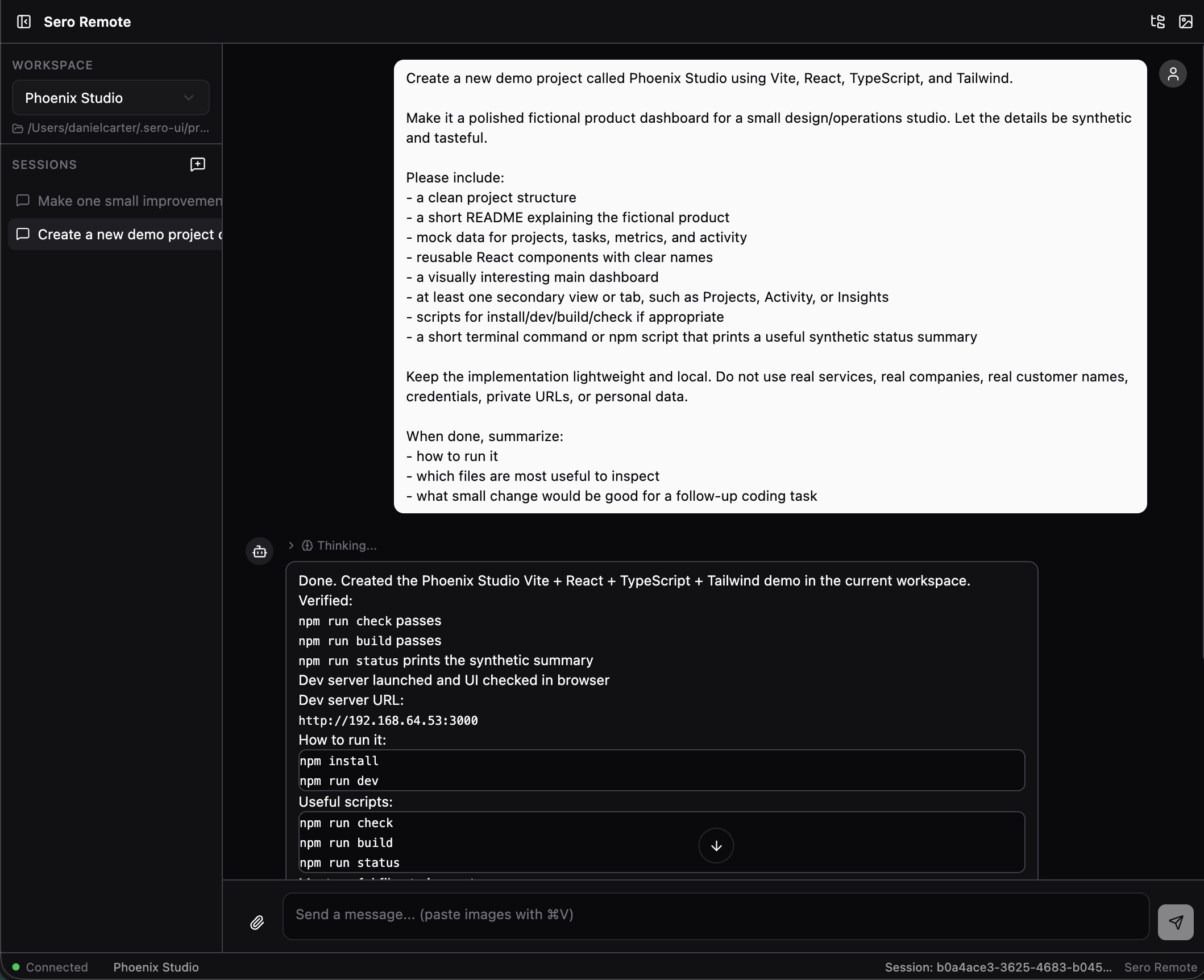
The web UI is useful when you want to continue a Sero session from another trusted device without opening the full desktop app on that device. It still controls the local desktop process and local workspace state on your machine.
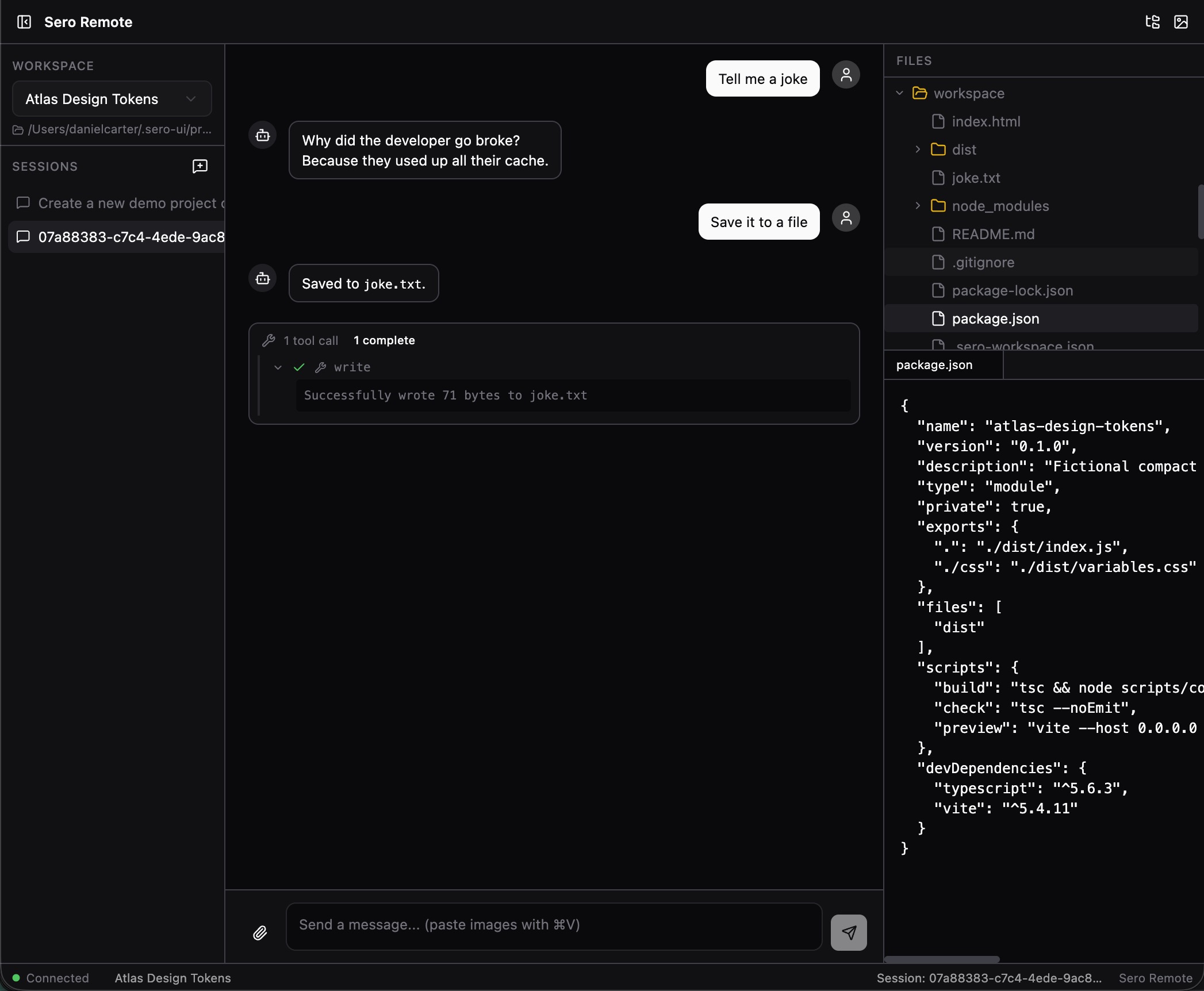
Local gateway endpoints currently include:
A basic/legacy local web UI may also be available on:
Dev-server previews are served from a dedicated listener:
When Sero exposes the gateway over the tailnet, it also maps this preview
listener to HTTPS port 8443 on the tailnet hostname. If you configure
tailscale serve manually instead, add that mapping yourself:
For remote web access, Tailscale is the recommended transport. Sero can expose
the gateway to your private tailnet through tailscale serve; a paired browser
then uses the tailnet URL and a temporary web token/login flow.
Install Sero Remote to a home screen
Sero Remote is an installable web app. Open its *.ts.net URL on the
phone, then use the browser's Add to Home Screen. It then opens
full-screen, with no browser chrome.
An HTTPS address is required. The tailnet URL is HTTPS; a plain
http://192.168.x.x address is not, and cannot be installed.
Notifications with the app closed
Open the notification feed and turn on On this device. Sero then notifies that phone when work finishes or needs you, even with the app closed.
The notification says where it came from, never what was said. Tap it and Sero Remote opens on the right workspace, over the tailnet.
Turn it off from the same place. Revoking the device's web token also stops its notifications at once.
Developer note. A service worker needs a secure origin. localhost
counts, so pnpm dev on your own machine can register the worker and
show the toggle. A plain-HTTP LAN address cannot, and the toggle says so
instead of failing later. To test a real push, use the tailnet URL.
Share a file into a workspace
Once Sero Remote is installed to the home screen, it appears in the
phone's share sheet. Share a PDF, a photo or a log to Sero and the file
lands in the open workspace's uploads/ folder, ready to mention in a
prompt.
A shared file waits up to 15 seconds for a workspace to open, because a share starts the app cold. If none opens, Sero says so rather than dropping the file quietly.
Dashboard widgets in the browser
Sero Remote has a Dashboard view. It shows plugin widgets, not the desktop dashboard layout.
A widget appears there only when its plugin opted in with "remote": true. A
widget that did not opt in is not listed, and its files are not served. Widgets
read and write the same state files the desktop uses, and update as the state
changes.
Widgets are read from the plugins installed on your desktop machine. Sero Remote never loads a widget from anywhere else.
Remote dev-server previews
Sero desktop tracks dev servers that are started through its workspace tooling or registered by the agent/CLI. When the gateway is enabled, Sero Remote can list those registered servers and open them through the gateway's built-in reverse proxy. This makes a dev server running in the local desktop session available to a trusted browser on your tailnet without exposing the dev server itself as a separate public or tailnet service.
The proxy is path-based on the gateway's preview listener (port 18802), which gives previews their own browser origin so the embedded preview stays isolated from the Sero Remote app itself:
Sero Remote obtains a short-lived dev-proxy ticket over its already
authenticated WebSocket connection before navigating to that path. The first
navigation may include the ticket as ?t=...; the gateway immediately promotes
it to an HttpOnly cookie scoped to that workspace/port proxy path. Tickets are
bound to one workspace and one port and expire automatically.
Practical behavior:
- only dev servers registered in Sero's dev-server registry are reachable; the proxy is not an arbitrary port scanner
- workspace-scoped web tokens can only create proxy tickets for workspaces they are allowed to access
- HTTP requests and WebSocket upgrades are proxied, so common HMR sockets can work through the remote preview
- HTML/CSS/JavaScript responses and redirect/cookie paths are rewritten where
possible so absolute paths continue to work under
/p/<workspaceId>/<port>/ - the upstream dev server continues to run on your machine/workspace container; the remote browser talks only to the Sero gateway URL served over Tailscale
- the embedded preview panel is resizable and includes an element picker (powered by React Grab): pick an element in the previewed page and its source context — on React dev servers, the component stack with file locations — lands in the chat composer
If a preview does not appear, confirm that the desktop app shows the dev server as registered/running for the target workspace and that the paired web client has access to that workspace.
Discord bot access
The Discord path is optional and separate from the web/Tailscale path. When configured, the gateway starts a Discord adapter that listens for DMs or mentions and forwards allowed messages into Sero.
Discord setup depends on environment/profile configuration:
SERO_DISCORD_TOKEN— Discord bot tokenSERO_DISCORD_USERS— comma-separated allowlist of Discord usernames or user IDs
Current behavior is fail-closed: if SERO_DISCORD_USERS is empty, the Discord
adapter refuses to start for security. Set an explicit allowlist before relying
on Discord access.
Use Discord for prompt-style interactions, not for full workspace browsing. The web UI is the richer remote control surface; Discord is a bot channel.
What Remote Control can access
An authenticated gateway client can interact with the same local Sero profile that your desktop app is using. Current gateway capabilities include:
- listing workspaces and sessions
- creating sessions
- sending prompts
- steering or aborting running agent turns
- checking status
- reading session history
- listing and reading files through supported gateway file APIs
- listing and fetching artifacts
- listing registered dev servers
- creating short-lived proxy tickets for registered dev-server previews
- creating, listing, and revoking web tokens when authenticated with the master token
Because prompts can cause the agent to use tools, a paired web client or allowed Discord user can have high-impact effects on your workspaces. Treat Remote Control access like access to the desktop UI.
Authentication model
Sero uses profile-scoped gateway credentials:
The master token is a high-privilege secret for the active profile. Web tokens are used for browser/device pairing and can expire or be revoked.
Current web-token behavior includes:
- tokens can be scoped to explicit workspace IDs or act as owner/profile tokens
- paired-device flows may grant access to all current workspaces and future workspaces in the profile
- scoped tokens can only request dev-server proxy tickets for authorized workspaces
- default expiry is time-limited
- only a limited number of active web tokens are retained
Dev-server proxy tickets are separate short-lived HMAC-signed bearers. They are
issued only after gateway authentication, bind one (workspaceId, port) pair,
and are stored as path-scoped cookies after the initial preview navigation.
Do not paste gateway tokens, web-token files, login URLs, QR codes, Tailscale serve URLs, Discord bot tokens, or Discord allowlists into bug reports, screenshots, chat transcripts, or public issues. See State and Folders for the canonical storage map.
Pairing details
Sero includes a pairing flow for connecting a remote browser or web client. The flow creates a time-limited web token and can produce a login URL or QR code for the browser. When served over Tailscale, that paired browser can control the local Sero session from another trusted tailnet device.
Practical guidance:
- Enable the gateway only when you need it.
- Use Tailscale serve for private tailnet web access.
- Pair only browsers/devices you control.
- Prefer QR pairing or login prompts over manually sharing token URLs.
- Revoke web tokens when a device no longer needs access.
- Disable the gateway and reset Tailscale serving when you are done.
Token URLs are sensitive because they can leak through browser history, autocomplete, screenshots, referrers, logs, or shared terminal output.
Known limitations
Remote Control does not provide:
- hardened remote administration
- production deployment support
- a stable public gateway API
- safe public-internet exposure
- full per-tool restrictions for gateway clients
- a complete security boundary around agent actions
- compatibility with every dev server, framework, CSP, HMR setup, or absolute URL pattern through the path-prefix proxy
- feature parity between the web UI and the desktop UI
- feature parity between Discord bot prompts and the web UI
The gateway has authentication and scope checks, but an authenticated client is still powerful. Master-auth clients can access the profile broadly. Scoped web tokens may limit gateway file/session/artifact access to specific workspace IDs, but that is not the same as a comprehensive per-tool permission system.
What to include in support reports
If Remote Control behaves unexpectedly, include these redacted details:
- whether the gateway was enabled with
SERO_GATEWAY=1 - whether the client used localhost, Sero Remote over Tailscale, Discord bot, or another path
- whether Tailscale
servewas active, and whether public funneling was avoided - whether the issue involved a master token or a web token
- whether the web token was intended to be workspace-scoped
- for dev-server preview issues: workspace ID, port, framework, whether the server was registered/running in Sero desktop, and whether HTTP or HMR/WebSocket traffic failed
- whether Discord was configured with
SERO_DISCORD_TOKENand an explicitSERO_DISCORD_USERSallowlist - the active platform, install path, packaged artifact type or source-build details from Support Scope
- a minimal redacted log excerpt
Useful logs can include:
Never include raw gateway tokens, web-token files, QR codes, full login URLs, Tailscale serve URLs, Discord bot tokens, or private tailnet URLs. Rotate any token that may have been exposed.