
State and Folders
Sero keeps profile data on the local machine. Use this map when you back up a profile, inspect state, or remove private data from a support report.
Profile roots
The fixed Sero root is:
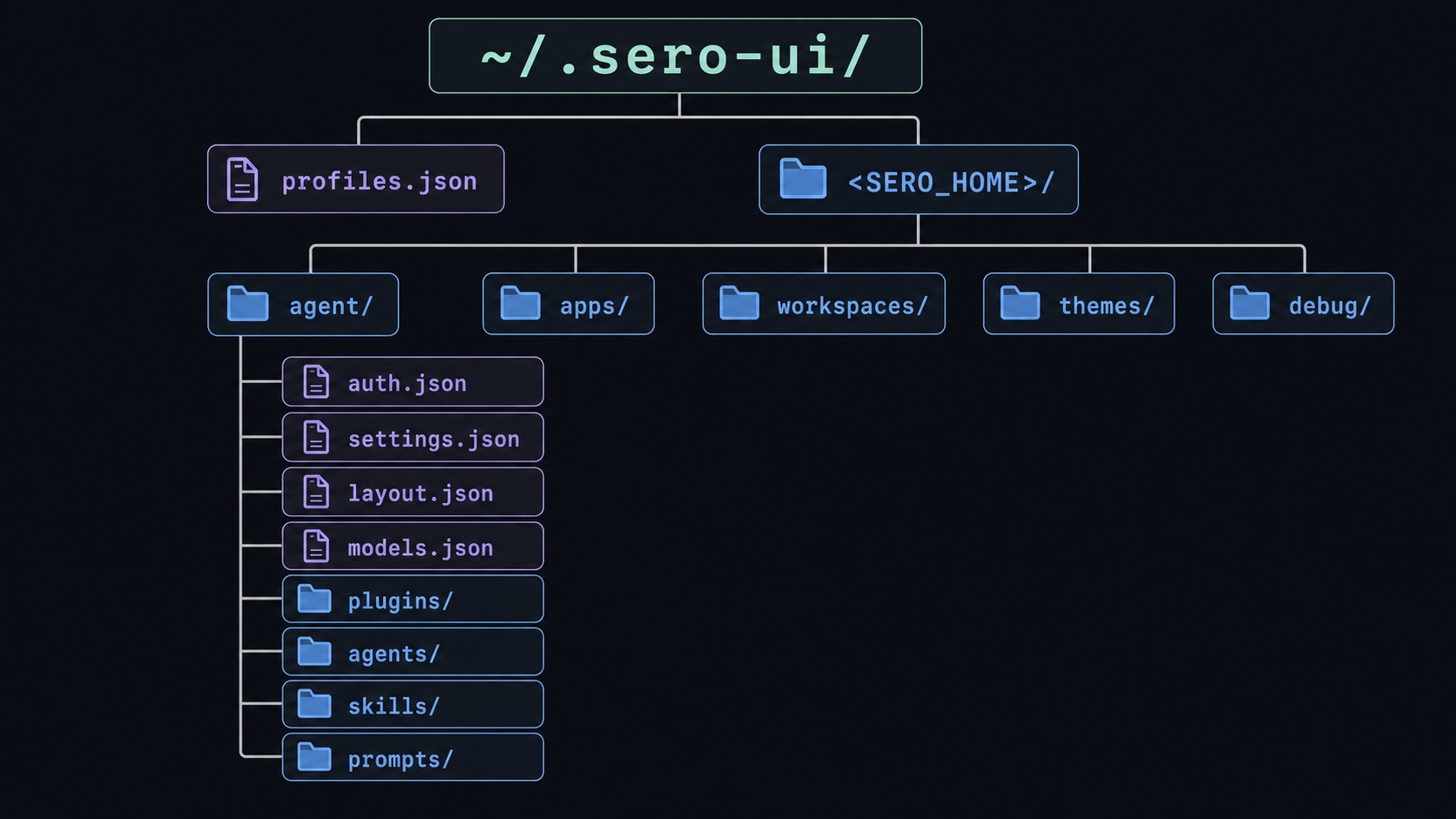
The profile registry is always ~/.sero-ui/profiles.json. Each registry entry points to a profile root. This page writes the active profile root as <SERO_HOME>.
Sero uses this agent directory for the active profile:
For the default profile, the exact agent directory is ~/.sero-ui/agent/. Sero sets PI_CODING_AGENT_DIR to this directory. Do not use ~/.pi/agent/ for Sero state.
Profile files
These files are durable profile state. A custom profile keeps them under its own <SERO_HOME>.
Workspaces and app state
Sero-managed workspaces are under <SERO_HOME>/workspaces/. The built-in global workspace is <SERO_HOME>/workspaces/global/.
A workspace can contain .sero-workspace.json for its runtime and workspace metadata. Workspace-scoped plugins store data under:
Global plugins store data under:
The plugin controls the files inside its directory. A common file is state.json, but this name is not required for all plugins.
Sero adds .sero/ and .sero-workspace.json patterns to the clone's .git/info/exclude. It does not edit the repository's .gitignore. Git can still report a Sero file if you force-add or already track it.
Memory files
Global memory and the profiles use the global workspace. Workspace memory and
the scratchpad use each workspace's .sero/ folder:
A profile upgraded from an older version keeps its old memory as
MEMORY.md.v2-backup. Memory error logs and metrics are under
<SERO_HOME>/debug/memory/. See Memory for the user workflow.
Logs and temporary files
Source-development logs are under ~/.sero-ui/logs/, unless SERO_LOG_DIR sets another location. Compatibility links at /tmp/sero-*.log point to current log files. These logs are not durable profile state.
Container workspaces have a log guide at /workspace/.sero/logs/README.md. It points to files such as:
Logs can contain paths, prompts, errors, and project details.
Complete command output
The bash tool keeps complete command output outside the model context. Each capture is a directory:
The model receives a bounded tail of this output. The complete files stay on disk, and the tool result reports their paths and sizes. A command with no output creates no capture.
The files hold the bytes the command wrote, including output that is not valid text. Sero does not hold the whole output in memory: when a command prints faster than the disk accepts writes, Sero pauses the command's output until the writes catch up. The command then blocks instead of the profile growing.
The capture root is outside every workspace, so no file watcher, workspace search, or language server sees it. A workspace container receives the same directory read-only.
A capture file can hold anything a command printed, including secrets. It is profile data. Sero deletes it after its last referencing session is released.
Retention
A capture stays while a session references it. The session that produced it is the first reference. A fork copies the branch, so the fork inherits the same references, and a fork of a fork inherits them again. Sero removes a capture only after the last referencing session is deleted.
Sero protects a new capture until a cleanup scan sees its saved session reference. If that reference is never saved, the next app startup can remove the orphaned capture.
Sero also keeps the host RTK state of a producing session while a surviving inherited capture can still reference its recovery output.
Referenced storage has no size or age limit. A session you keep can accumulate output without a ceiling. A quota would change the complete-capture or retention contract, so it requires a separate decision rather than a setting.
When a capture cannot be written
A full, read-only, or unavailable disk never fails the command. The command keeps running, its exit status and bounded result stay available, and the result states that the complete output is unavailable instead of reporting a path. A partial file is never reported as complete, and Sero retries a failed cleanup on a later sweep.
Container lifetime
Sero resolves the capture root on the host, so a complete-output link always points at the host copy. A container receives that directory read-only and cannot write to it.
RTK tracking and recovery state for container commands is separate. It lives under the container's own /tmp/sero-home/rtk/, so it is removed with the container and never writes into the profile.
Host RTK state
RTK tracking and both recovery modes use a session directory:
Sero supplies these locations to RTK, so an existing RTK recovery configuration cannot redirect its writes outside them. Sero removes the directory when its session is deleted, unless a surviving inherited capture can still reference its recovery output.
Protect private state
Do not share raw credentials, .env files, gateway tokens, model configuration, layout state, workspace registries, agent definitions, memory files, or plugin state. Review logs before you attach them to an issue.
Profile storage is an organization boundary, not a cryptographic boundary. A process that can read the profile can read many of these files.