
Plugins
A Sero plugin can provide Pi tools and commands, a React app, and an optional background runtime. It can also contribute components or standard controls to host-owned extension points.
New authors should start with Plugin Quickstart. Users who only want to install an app should use App Store, Favorites, and Installed Plugins.
Install a plugin
Open App Store to browse installed apps or discover community plugins. The installer accepts these source forms:
Git and local installs can install dependencies and build source. They support
npm and pnpm package managers. A source package must not contain unresolved
workspace: or catalog: dependency versions. Install source only when you
trust the repository.
An npm UI package must include dist/ui/remoteEntry.js. A Git or local source
package with a UI needs a build script unless it declares a prebuilt package.
Develop a local checkout
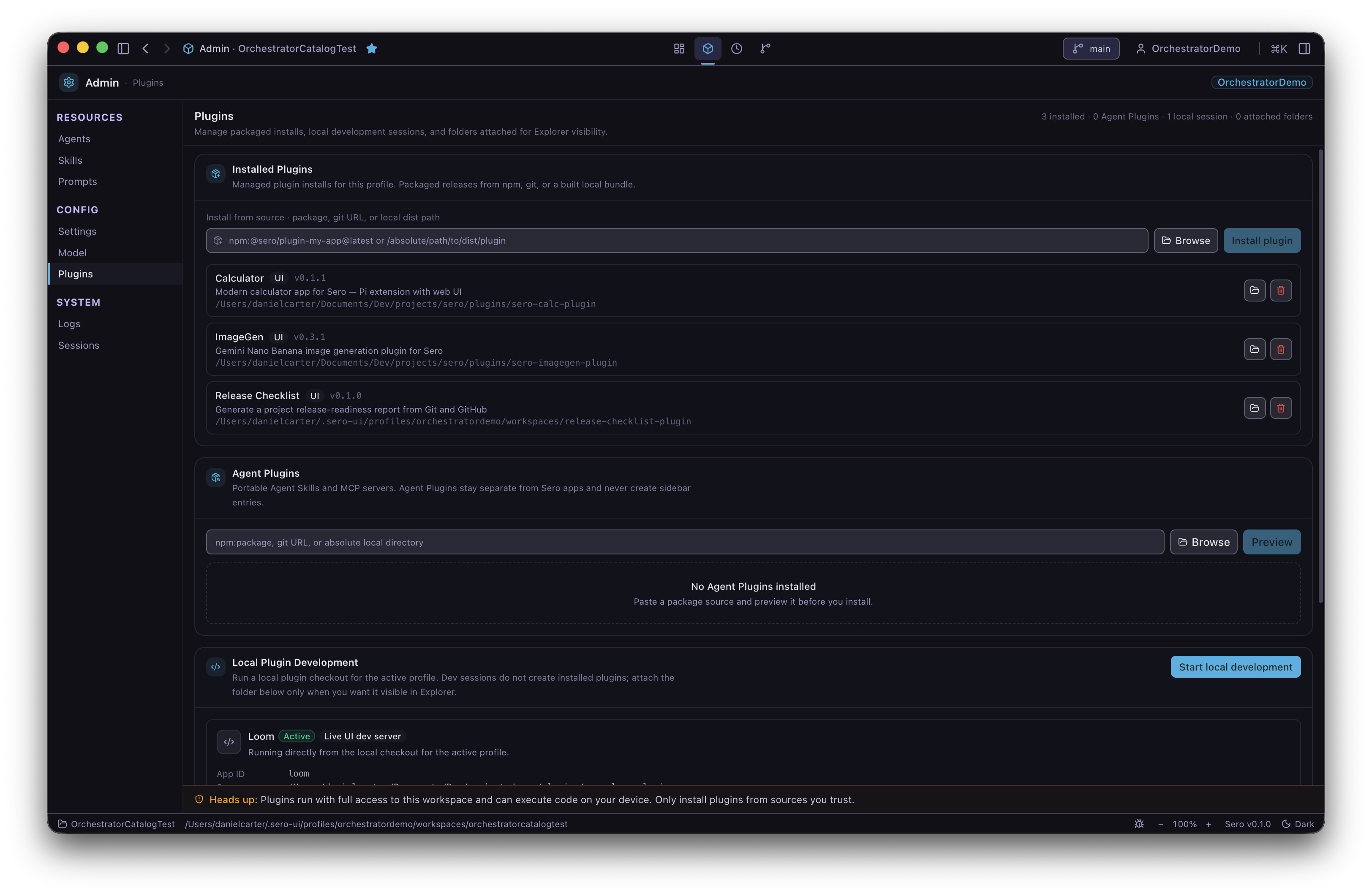
Use Admin → Plugins → Local Plugin Development. This flow activates a source checkout in the current profile. It is not the same as an installed plugin or a folder attached to a workspace.
For a UI plugin, Sero:
- validates the manifest and host compatibility;
- reads
scripts.devandsero.app.devPort; - starts the development command on the host;
- checks the loopback
mf-manifest.jsonand confirms the remote name; - uses the live UI when it is ready;
- uses built
dist/uioutput as a fallback when it is available.
Sero owns this development server process. If another process uses the port, stop it and let Sero start the server. UI edits refresh the plugin surface. Edits to extension, runtime, shared, resource, or manifest files refresh the development session.
The page can report these states: Starting, Active, Needs attention, and Broken. Use the shown error and redacted logs to correct a failed session.
Federated UI contract
Current UI plugins must:
- declare
sero.plugin.runtimeAbias3; - declare
sero.app.styleIsolationas"scope"; - use
seroPluginCssScope()from@sero-ai/plugin-vite; - use
base: './'for production; - expose each module as
./<Component>in Vite; - use
<Component>without./in the app manifest; - default-export a React component from each exposed source module;
- import the plugin stylesheet from each exposed entry.
The current package versions in this repository are
@sero-ai/app-runtime@0.4.0 and @sero-ai/plugin-vite@0.1.1. External plugins
must use published versions instead of monorepo workspace: versions.
Compatibility checks
Sero checks sero.plugin.minSeroVersion and
sero.plugin.requiredHostCapabilities. It also checks the runtime ABI for a
plugin that has a federated UI. A UI plugin with a missing or different ABI is
inactive. An extension-only plugin has no federated UI ABI check.
State can remain on disk when a plugin is inactive. Do not use activation as a signal that plugin-owned data was deleted.